Tuesday, December 19, 2017

Amazon Echo Show rolls out more visuals, Drop-in video calling


The new Echo Show is a real showstopper

The new Amazon Echo Show was left under the Christmas tree and we couldn’t wait until Christmas morning. This is one fun device and is worth tearing into the box early.

The Echo Show is about as technologically advanced as you can get and does just about everything, plus more things you’ll discover while exploring the many features.

The twist with the Echo Show is that it shows you what’s happening with visuals along with the voice notifications. The previous Echo devices fall short of the Echo Show’s features. Let’s take a closer look at the unique engineering of the Amazon’s latest wonder.

Echo Show: What’s under the hood

The Echo Show is square-shaped at 7.4 inches by 7.4 inches, with a seven-inch touchscreen color display. It tips the scales at around 41 ounces. There is a five-megapixel camera tucked away in the top bezel and blends in so well you might not notice it.

On the top of the housing, you’ll find three simple buttons -- a volume up, volume down, and a combination Mics/Camera/On/Off button.Down low, near the base, there is simply a power port. And that’s it for buttons and ports.

-----------------------------------------------------------------------------------------------------------------------------------------

Learn more about the stylish Echo Show

-----------------------------------------------------------------------------------------------------------------------------------------
The magic starts with what’s lurking behind the mesh screen covering about a third of the front fascia which is where you’ll find two speakers powered by Dolby technology. I must say they sound really good.

If you look really close around the buttons on top, you’ll see a perforated ring surrounding the buttons that hides with eight microphones with beam-forming and noise cancellation technology to pick up your voice from across the room. I can vouch that this does work from the couch, my hangout, to the table across the room, where the Echo Show hangs out.

If I had to describe it, in a nutshell, it’s an inverted-wedge-shaped powerful voice-commands computer with no keyboard or mouse that always on and ready for your input.

Echo Show ready for action out of the box

Getting the Echo Show up and running is simple and easy. Just take it out of the box, plug it and twiddle only “one thumb” while it connects to the Internet. Alexa will be waiting.

If you’re the least bit familiar with the other Echo devices, such as the 1st and 2nd generation devices, and the newer Dot, Plus and Spot devices, you’ll be ahead of the game in operating the Echo Show. A lot of the things to try are similar, but the Echo Show has lots of new features and tricks to show off.

Video and visuals define the Echo Show

Just about every feature of the old devices is now visual on the Echo Show, such as the calendar, lists, songs, weather forecasts and the list goes on and on. Book covers are shown while reading Audible audiobooks content, as well as an album or CD artwork for music. Pandora, Spotify, TuneIn, iHeartRadio visuals - they’re all there in full color. If you’re like me and can’t remember the words to songs, the lyrics are scrolling on the display as the songs play on the Echo Show.

Just like some of the earlier Echo devices, the Echo Show continues interfacing or syncing with compatible devices, such as room monitors, lights, thermostats, Philips Hue, Sony and other smart home devices. But since the Echo Show has a display, we can now add baby monitors and security cameras, such as the Amazon Cloud Cam. Pairing with Amazon Fire TV allows access to Amazon Video on the Echo’s seven-inch display.


Echo Show redefines “can you hear (and see) me now”

Perhaps the biggest unique feature of the Echo Show is the capability to make video calls from one Echo Show to another Echo Show, using the somewhat controversial Drop-in feature. You can also just call another Echo in the household and use them as an intercom between rooms.

Or you can use the Alex app on your mobile phone to make a Drop-in call to your own Echo Show at home and activate the camera for a makeshift security check from a remote location. Because of privacy concerns, you’ll want to pay special attention to the Drop-in feature and who actually has Drop-in access in your contacts list. The Drop-in feature is very powerful and you’ll want to have a good understanding of how it works.

The Drop-in feature would be great for checking on a sick friend or relative, seniors living alone, children or even the Pets, where you could tell Fido to get off the couch during the day. Yes, you can speak through a mobile phone remotely to the Echo Show, even if no one answers the call.

Other fun stuff includes telling Alexa to “take a selfie” with the camera and asking her to “find free Amazon prime movies,” which can be played on the seven-inch display.

Echo Show’s constant display of information draws attention

When idle, the display has three rotating screens, which include the current time and temperature, another with the tomorrow appointment from your calendar and the third could be a video trailer, maybe from Netflix, a news headline from The Washington Post or general trivia from other sources. When passing by the Echo Show, you'll have to pause a moment to see what you can learn from the constantly-changing display screen.

The lack of YouTube content for the Echo Show has been an on and off feature as Google and Amazon go back and forth rights and privileges. Lots of folks are hoping Amazon can reach an agreement and have access to the wealth of content available on YouTube. If you ask Alexa to search for YouTube content, she has an answer for you.

"YouTube is not available," says Alexa in a stern voice. "Here is what I found." The latter refers to similar content available from other sources, such as Vimeo and Dailymotion, which also are video-sharing websites.

The Amazon Echo Show is available at you-know-where for around $150 and also can be found at some Best Buy brick-and-mortar stores. I purchased the last one on the shelf at my local Best Buy.

Just like my conclusion in the Drone article, I didn’t know I needed an Echo Show until I got one. I thought the tall guys, the 1st Generation, and 2nd Generation Echo devices met my needs. But the Echo Show is such an impressive technological device, I need another one. It looks like I'm hooked again.

-----------------------------------------------------------------------------------------------------------------------------------------

Echo Spot: A stylish and compact Echo with a color screen

-----------------------------------------------------------------------------------------------------------------------------------------

Saturday, December 9, 2017

Propel Dart 1.0 drone small in size, large in flying performance

Propel Dart 1.0 drone is small in size and arge in drone performance

Propel Dart 1.0 drone is perfect for beginners


My first drone, the Propel Dart 1.0, found its way into the shopping cart because it was on sale. I never thought I would want a Drone or even like flying a Drone, or let's say “trying to fly” a drone.

The Propel Dart 1.0, my first drone, is about the size of a pack of cigarettes, plus four rotor blades. The technical specs say it’s a 2.4 GHz indoor/outdoor high-performance flying machine with a 200-foot operational range, supported by a 2.4G radio remote controller. Just like its larger cousins, such as a Boeing 747, it has LED directional white lights the front and red on the back.

The Propel company has been in the drone business in the United States since 2006 and recently launched a line of Disney “Star Wars battle drones” with reverse propulsion, flight simulation, an iOS app and gaming for up to 12 players.

For the Dart, I choose the bright red color off the shelves, as I thought it would be easier to see or find in the bushes or a field if my flight pattern went haywire. Or could easily be spotted in the top of a tree, for which I hear stories of this being the final resting place for a lot of spanking-brand-new drones. It also comes in silver and blue.

Propel drone includes spare rotor blades, removable controller grips


In the box, protected by industrial-strength plastic packing, I found the Dart 1.0, a Wireless Controller, a USB charging cord, some spare parts and an intimidating instruction booklet for such a small device. Later on, I would appreciate having the spare rotor blades.

Once out of the box, make sure the Dart is charged and ready for action. The drone unit uses a USB connector that “must” be plugged into a computer, which I find odd since it’s not actually syncing to the computer. A red LED light on the USB plug will indicate charging is complete, which could range from 30 to 45 minutes for five to seven minutes of flying time. The controller requires two AAA batteries.

The controller, or remote, is feature laden for such a small device, with controls for adjusting forward and backward trim, as well as banking and the yaw. With the proper adjustments, the Dart is supposed to hover steadily in mid-air with no drifting left or right, forward or backward. There is also a six-axis gyro tucked away inside the device to assist with level hovering and flight.

Dart 1.0 start/land buttons help drone with smooth takeoff and landings


For beginner drone pilots, like myself, I also appreciated a dedicated Start and Landing button to safely get off the ground and back down again without any mishaps. The Dart has four modes - Training, Slow, Medium and High. I’ll be in (T) Training mode for a while, which allows you to learn to fly at a slow speed. After familiarizing myself with the controls, it’s time to fly.

-----------------------------------------------------------------------------------------------------------------------------------------

Buy Now: Propel Dart 1.0

-----------------------------------------------------------------------------------------------------------------------------------------
This drone has a three-channel mode for beginners and a four-channel mode for advanced flying. It’s helpful to know the default setting for the Dart is in four-channel mode and you might consider stepping down a notch to novice before taking off.

You’ll need to sync the Dart and Controller before taking off into the wild blue yonder. Just place the drone on a flat surface and activate the throttle lever. The LED lights should turn on, clearing you for takeoff.

Of course, the directions say you should be in a wide open space, with at least a 200-foot radius. I’ll have to settle for my driveway.

Propel Dart 1.0 drone controller has automatic start and landing buttons
Thanks to the automatic take-off button, I’m off the pavement and in the air in a breeze. With a careful press of the direction lever, I move toward a chain link fence in a controlled manner. Then back to the airport, or my take-off spot on the driveway, followed by pressing the automatic landing button, and the Dart landing softly with everything intact. The rotors automatically shut off after landing. After you build your flying skills and confidence, you can exit training mode, manually start the rotor blades to spinning and lift off using the throttle lever. The challenge in manual mode will be to return at some point and land safely.

Propel Dart programmed for automatic stunt rolls


The Dart is capable of doing 360-degree aerial rolls, with a dedicated Stunt Roll Button waiting to be pressed once you feel like an expert. It’ll require some quick maneuvering of the control stick to accomplish these tricks.

Although the Dart is considered a toy and can be purchased for around $40, it has remarkable engineering and still falls under the Federal Communication Commission (FCC) compliance rules Part 15 for a Class B digital device. If the weight was above 0.55 pounds, it would need to be registered with the Federal Aviation Administration (FAA) for small unmanned aircraft.

I’m looking forward to purchasing a larger drone at some point with the integrated camera and more features. Or maybe I’ll put a couple of mid-range devices in the Amazon basket to hone my piloting skills a little more before going all out with a DJI, GoPro, UDI, Hubsan, or Yuneec. At some point, I hope to be ready for a Cadillac of drones.

At any rate, I didn’t know I would like a drone, but now I need another one. I’m hooked.

-----------------------------------------------------------------------------------------------------------------------------------------

DJI Phantom 3 Standard Quadcopter Drone with 2.7K HD Video Camera

-----------------------------------------------------------------------------------------------------------------------------------------

Monday, December 4, 2017

Laptop Lift 90 helps to get organized, maximize desk space

The laptop lift 90 organizer is a combination riser and space-saver when used as a stand for storage and to maximize desk space

Laptop Lift 90 optimizes workspace


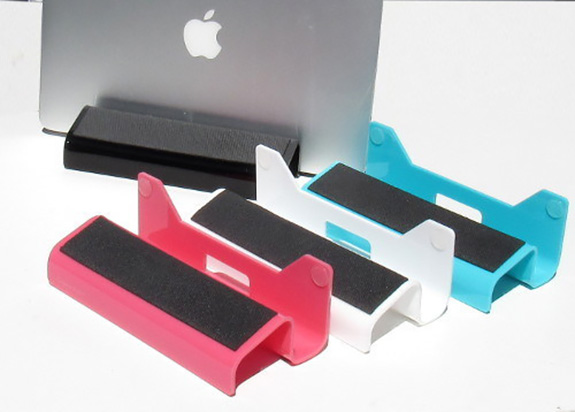
The Laptop Lift 90 is a combination riser and space-saver while also improving laptop function and the overall look of your workspace.

This laptop organizer, introduced by newPCgadgets, a company with a mission to design unique computer products and accessories for Apple and PC computers, has claims of offering the only laptop accessory in the market with these uniques features.

When using the Laptop 90 as a riser, it raises the laptop about one inch for increased ventilation, while holding it upright when used as a stand for storage and to maximize desk space.

Vibrant colors of Laptop Lift 90 improves look of desk

According to their president Michael Schriner, "With our new Laptop Lift 90° we have created a new way to organize the desktop, improve laptop function and save space. We have also enhanced the look of the workspace by offering vibrant colors that really stand out."

Laptop Lift 90 designed for popular computers


The Laptop Lift 90° is designed for both home and office and is constructed of glossy acrylic, with non-slip neoprene pads. It is designed to hold popular laptops, such as the MacBook Pro, MacBook Air, Surface Book, Dell Latitude, Lenovo, HP Pavilion and other brands.

If you’re shopping for Christmas, the Laptop Lift 90 comes in pink, blue, white and black, and is available for around a special introductory price of around $20 on the company’s website.

Executive Office Solutions Portable Adjustable Aluminum Laptop Desk/Stand/Table Vented w/CPU Fans Mouse Pad Side Mount-Notebook-Macbook-Light Weight Ergonomic TV Bed Lap Tray Stand Up/Sitting-Black


Monday, August 28, 2017

Answer the door anywhere with the NuTone Knock video doorbell

A door chime company that has been around at least 80 years still has the magic in home comfort and convenience as they announce the Nutone Knock, which is their new video doorbell.

The NuTone Knock, made by Broan, LLC, and NuTone, allows homeowners to see and speak to visitors in high resolution from anywhere on a smartphone or tablet. Using motion sensors, night vision and alarm functions, the device fosters peace of mind in knowing your home is safe and secure.

"Homeowners have been asking for a multi-function doorbell system that combines the best intercom technology with security," said Jessica Lindquist, Global Category Director, Home Comfort & Convenience, for NuTone.

According to the company, the NuTone Knock is easy to install and has exceptional Wi-Fi reception along with built-in voltage detection to tap into your existing doorbell wiring. The weather resistant features allows it to withstand dust, water, and temperatures between minus 22 degrees to 122 degrees.

Some of the other features include:

• Two-way audio and HD video from your door to any smart phone or tablet around the world, or from the safety of your own home
• Night vision camera allows you to see who is at your door in crystal clear high definition in any low light condition
• Quiet hours option silences the door chime during nap time, family time or movie night
• 180-degree high definition camera lens

The NuTone Knock is available at Amazon.com, Build.com or from a local retailer in your area.

The Ring Video Doorbell is another popular option and also offers video, two-way audio and motion sensors, which allows you to see and speak to visitors from anywhere on your smartphone, tablet, or computer. In addition to being able to be hardwired, the Ring also comes with a rechargeable battery pack. The Ring is available now for $199.

With these remote home monitoring device, you’ll always know when someone is at the door.

Thursday, August 17, 2017

UAG expands rugged cases line to Microsoft Surface laptop


For adventure seekers, Urban Armor Gear has introduced a new rugged case for the Microsoft Surface laptop that is built to military drop-test standards.

Widely known as the maker of various rugged cases for the latest iPhones and Samsung Galaxy devices, UAG strives to offer protection for thrill-seekers out on the trails with their mobile gear.

"Laptops hold so much valuable information, and we are delighted to introduce a case that is designed to offer ultimate protection for Microsoft Surface devices," said Michael McVerry, Senior Marketing Manager at UAG.

-----------------------------------------------------------------------------------------------------------------------------------------

UAG Microsoft Surface Pro 3 Feather-Light Composite [BLACK] Aluminum
Stand Military Drop Tested Case

-----------------------------------------------------------------------------------------------------------------------------------------
Their latest case for the Surface laptop will cost around $80 for a dual-lock screen closure, tactile grips, and of course, a Surface Pen Holder. Your color choice is limited to Ice, which seems to be a popular choice for their cases for other devices.

I recently reviewed the case for the iPhone 7 and found it to be well constructed and lightweight. My iPhone was well protected and I would also consider a UAG case for the Surface laptop if one appears under the Christmas Tree.


Friday, August 11, 2017

Vizio brings Amazon Video, more apps to SmartCast TV platform


Find the TV remote, because Vizio Inc. is hoping to grab your attention with Amazon Video on their SmartCast TV platform.

With just a few taps of the remote, SmartCast TV users can access content from Amazon Video, along with other favorite apps such as Crackle, Hulu, iHeartRadio, Netflix, Pluto TV, Vudu and XUMO1 on the big screen.

The new features are available now to all 2017 VIZIO SmartCast P-Series and M-Series Ultra HD Displays, with plans to add additional series such as 2017 VIZIO SmartCast E-Series Ultra HD Displays later this summer.

Amazon Video allows consumers to buy or rent thousands of movies, while also granting unlimited access to thousands of titles, such as the Amazon Original Series and Movies such as Transparent, The Grand Tour and Manchester by the Sea and kids series Tumble Leaf. For new Prime customers, there is free 30-day trial to try out Prime Video.

"With the recent launch of SmartCast TV, one of the things we're most excited about is providing consumers with added entertainment options," said Matt McRae, Chief Technology Officer, VIZIO. "Amazon Video brings an array of content options to the screen, all accessible on the traditional remote via the Amazon Video button. We're glad to continue to bring in-demand content and solutions to our customers."

The addition of Amazon Video to VIZIO SmartCast TV gives consumers access to even more content options with features including select 4K Ultra HD titles on compatible displays featuring VIZIO SmartCast TV. Because the app is accessible directly from the display, Amazon Prime members can now easily access movies and TV episodes without the need for a separate streaming device.

To get started, you'll need the new 2017 remote featuring the V-button, which has a one-button access to the VIZIO SmartCast TV user interface, along with shortcut keys to top apps, including Amazon Video.

If you already have an eligible Vizo model TV and meet certain conditions, you can receive the new SmartCast remote free or for a nominal fee.

Wednesday, February 1, 2017

LifeFlicksTech Archive

Browse previous articles for the latest developments in consumer technology:

Laptop Lift 90 maximizes desk space

----------------------------------------------------

NuTone Knock video doorbell

----------------------------------------------------

UAG expands cases to Surface laptop

----------------------------------------------------

Vizio brings Amazon Video to SmartCast TV

----------------------------------------------------

Using cloud-based tools for teamwork

----------------------------------------------------

iPhone 7 Urban Armor Gear cases

----------------------------------------------------

Jackery Jewel cable spare battery

----------------------------------------------------